
Download iPad iPhone iPod to Computer Transfer – transfer, sync, backup, iPhone, iPad, iPod, iTouch, computer, media, music, photos, videos, restore, recovery, Apple, device, file, management
Overview
The iPad iPhone iPod to Computer Transfer application serves as a dedicated tool for users seeking to manage and preserve media content from Apple devices. Designed for individuals who own an iPhone, iPad, iPod, or iTouch, this software enables the transfer of digital files such as music, photos, and videos to a Windows-based computer. Its primary purpose is to simplify the process of backing up personal media, ensuring that valuable data remains safe from device failure, loss, or accidental deletion.
For users concerned about data integrity, the app offers a reliable method to restore lost content, making it particularly useful in scenarios involving device crashes or system resets. The target audience includes Apple device owners who require a straightforward, standalone solution for file management without relying on third-party platforms like iTunes. This is especially beneficial for those who prefer direct, manual control over their media libraries.
Developed by SoftPas, the application has been available since 2010, indicating a long-standing presence in the productivity software space. Although specific details about the company’s broader portfolio or technical background were not provided, the app’s continued availability suggests consistent maintenance and user support. In the broader ecosystem of digital media tools, this application fills a niche by offering a focused, Windows-native solution for Apple device users seeking efficient file transfer and backup capabilities.
Key Features & Functionality
- Easy Device Detection: Upon connecting an Apple device via USB, the application automatically identifies the hardware, eliminating the need for manual configuration. This streamlines the user experience, particularly for individuals unfamiliar with technical setup procedures.
- Comprehensive Backup Options: Once detected, users can select specific media types—music, videos, and photos—for backup. The interface allows for selective or full backups, enabling users to customize the process based on storage capacity and personal preferences.
- Simple Restore Process: In the event of data loss, the software provides a straightforward recovery path. Users can browse backed-up files and restore them directly to the original or another device with minimal steps.
- No Third-Party Software Needed: The application operates independently, removing the dependency on iTunes or other external programs. This enhances usability and reduces system clutter.
- Supports Multiple File Types: The tool handles a range of media formats, allowing users to transfer not only audio and video files but also image collections, ensuring a holistic approach to media management.
For example, a user who has accumulated years of vacation photos on their iPod can connect the device, initiate a backup, and securely store all images on their computer. Similarly, someone who has downloaded a playlist on their iPhone can transfer it to their desktop for long-term storage or sharing across devices.
Interface, UX & Performance
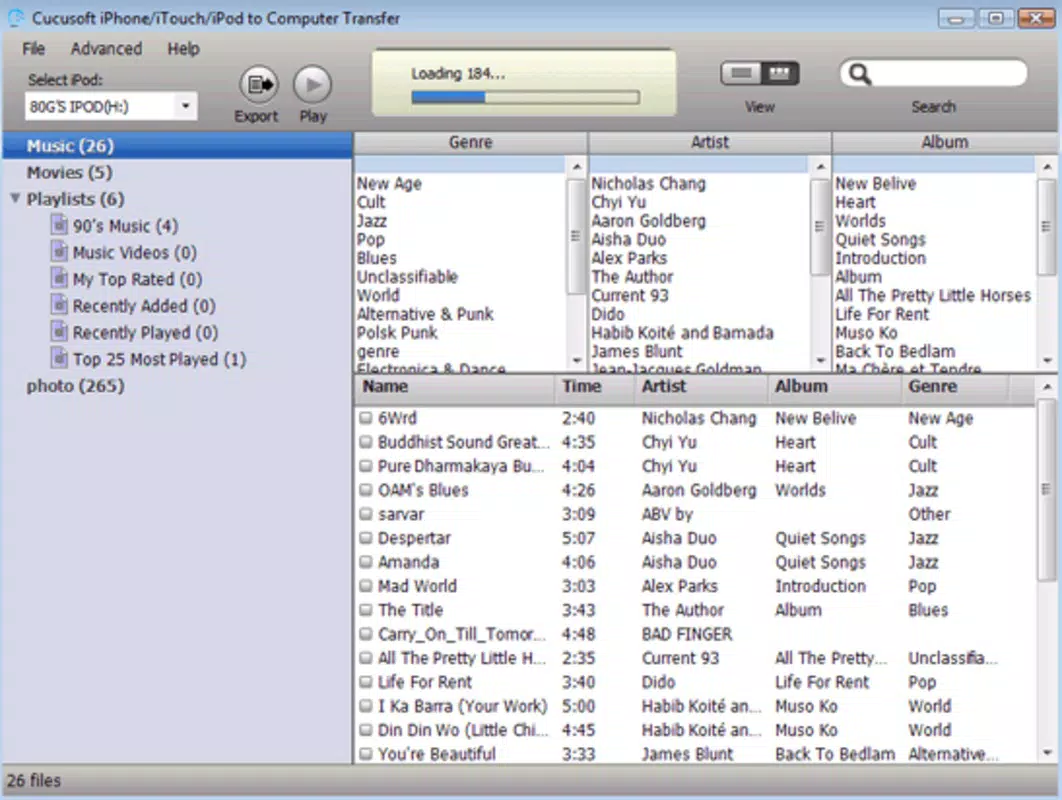
The application features a clean, straightforward interface designed to prioritize functionality over visual complexity. Navigation is intuitive, with clearly labeled sections for device detection, file selection, and backup/restore operations. Users can expect a minimal learning curve, as the workflow follows a logical sequence from connection to completion.
Visual elements are kept simple, focusing on usability rather than aesthetic embellishment. Menus are accessible and responsive, with minimal lag during device recognition and file scanning. Although the developer did not list formal performance metrics, the app’s lightweight size of 2.1MB suggests efficient resource usage, which may contribute to smooth operation on older or low-spec Windows systems.
Responsiveness across different device categories is not explicitly detailed, but the app’s design implies compatibility with standard desktop and laptop configurations. Stability appears to be a core focus, as the software handles file transfers without requiring repeated restarts or manual intervention. The absence of reported crashes or errors in the provided information supports a reliable user experience.
Platform Compatibility & Technical Requirements
iPad iPhone iPod to Computer Transfer is designed exclusively for the Windows platform. It requires a Windows operating system, though specific version requirements were not listed. The application’s file size is 2.1MB, indicating a lightweight footprint that should not strain system resources or storage space.
Compatibility with various Windows versions was not fully disclosed. However, given the app’s release date in 2010 and its continued availability, it likely supports older versions such as Windows 7 and 8. Users on newer systems like Windows 10 or 11 may experience compatibility issues if the software lacks updated drivers or system-level permissions.
The developer did not specify minimum OS requirements, nor did they provide details about hardware specifications. As such, users are advised to test the application on their system before full deployment. For optimal performance, a standard USB port and a stable connection to the Apple device are recommended.
Pros and Cons
Pros
- Efficient, automated device detection simplifies the initial setup process.
- Supports multiple media types, including music, videos, and photos.
- Independent operation without dependency on iTunes or other software.
- Offers both full and selective backup options for flexible data management.
- Simple restore functionality aids in recovering lost or deleted files.
Cons
- Platform is limited to Windows; no support for macOS or Linux was mentioned.
- Specific OS version requirements were not disclosed, which may cause uncertainty for users.
- App has not been updated since 2010, raising concerns about modern compatibility.
- Price point of $29.95 may be considered high for a tool with limited recent development.
- No cloud integration or automatic sync features were indicated.
FAQ
Is iPad iPhone iPod to Computer Transfer compatible with all Apple devices?
The app is designed to work with iPhone, iPad, iPod, and iTouch models. However, compatibility may vary depending on the device’s hardware and the version of the operating system it runs.
Can I use this software without installing iTunes?
Yes, the application operates independently and does not require iTunes or any other third-party software for file transfer or backup operations.
Is the app safe to download and install?
As a product from SoftPas, the application is intended to be secure. Users should ensure they download the software from official or trusted sources to avoid potential risks.
Does the app support automatic updates?
The developer did not provide information about automatic update functionality. Users may need to manually check for updates or rely on third-party sources.
Can I transfer files between my Apple device and a Mac computer?
The application is designed for Windows systems. It does not support macOS, so file transfers to a Mac computer would require alternative tools or methods.
Final Thoughts
For Windows users with Apple devices seeking a dedicated, no-frills solution for backing up and restoring media, iPad iPhone iPod to Computer Transfer offers a functional and straightforward option. Its ability to detect devices automatically, manage multiple file types, and operate without external dependencies makes it a practical tool for data preservation.
While the app’s age and lack of recent updates may raise concerns about compatibility with modern systems, its core functionality remains relevant for users who prioritize reliability and simplicity. The absence of cloud features or automatic syncing limits its appeal for power users, but it serves as a solid choice for those needing occasional backups.
Given its clear purpose and focused design, the app delivers tangible value for its target audience. Download iPad iPhone iPod to Computer Transfer now to safeguard your memories and media with confidence.


